GLOBAL ADVERTIZING .COM
Have your ad appear through 7,000+ advertising websites
Reach out to 6.6 million visitors annually -
Rates start at $35 for 35 websites for 1 year
We
help your goods and services be found on the Internet. The more
websites that you advertise on, the more times your ad will be found and
the more potential customers you will reach. People
will find your products or services just like you found this website. Our
websites are specific to your products and services. We
also help your own website be found on the Internet by the search engines
by boosting the number of links to your website.
Let us help you!
If you have any questions, you can
call us and talk to a real person for support.701-579-4298.
You will be able to
select the websites that you want to advertize on.
AdvertiZing Rates:
One Year
Your ad found on 7,000 websites -
Featured ad on 35 websites
Total cost
- one year $35
Your ad found on 7,000 websites -
Featured ad on 40 websites
Total cost
- one year $40
Your ad found on 7,000 websites -
Featured ad on 100 websites
Total cost - one year $100
Featured ad on 1000+ websites
Call 701-579-4298
Bonus Ad
Special......Get 50 different
featured ads on
70 of our websites.
Works great for real
estate agents!!
Click here for details
or Call 1-701-579-4298 and ask
for Kerry for details.
Some of our customers advertise on over
1,000 of our websites!
You can place up to 16 photos (with or
without captions) with each ad
Your ad will be displayed within
minutes of your ad submission when payment clears.
You can make nearly unlimited text or photo
changes to your ad
You can change the websites your ad is
located on
The more web sites that you advertise
on, the more people will see your ad and the better chance you have to
sell your product or services to the world
You do not need a website for people
to find you on the internet. With our ad format, you will be
able to write plenty of text and show 10 or more photos to describe your
listing which will appear on your own individual ad webpage. Use
each photo to describe an individual product or property. Like
having 10 mini ads within you main ad....
If you are not advertising on the
internet, you are missing an opportunity!!!!
If you have any questions, you can
call us and talk to a real person for support. 1-701-579-4298
In a world driven by consumer needs and
accessibility, the Internet has become the fastest and cheapest means
for company and product advertising. Where else can you advertise on a
website that is directly related to your product for as little as
$3.50/yr? Global AdvertiZing, LLC is dedicated to giving the
worldwide community the fastest method of direct contact with you and
your services. All of us at www.globaladvertiZing.com
look forward to helping your company succeed and grow.
When you advertise your goods and
services on our websites, not only will you be found on our highly
visible websites, but if you have your own website, we help your
website be found by the search engines by driving traffic to your
website. You place a link to
your website on our websites, and the search engines will start to
recognize you as a "hub" of information for your specific
product or services. We don't require a backlink from you.
That's when you start to rise in the search engine
rankings.
Not only do we help with website recognition, we also offer you the
chance to create a webpage specific to your product. You may
place 10 photos with descriptions on this page. Use each photo
to describe an individual product or property. Like having 10
mini ads within you main ad. If your product or property sells
before the ad runs out, you can replace the ad with a new product or property on the
same ad space until the duration of the ad is over.
Since our websites describe your specific goods and services, the more
websites you place your descriptions on, the easier it is for new
customers to find you. And the easier it is for the search
engines to find you.
Ad Submission is a 5 step
process. Each step is discussed below.
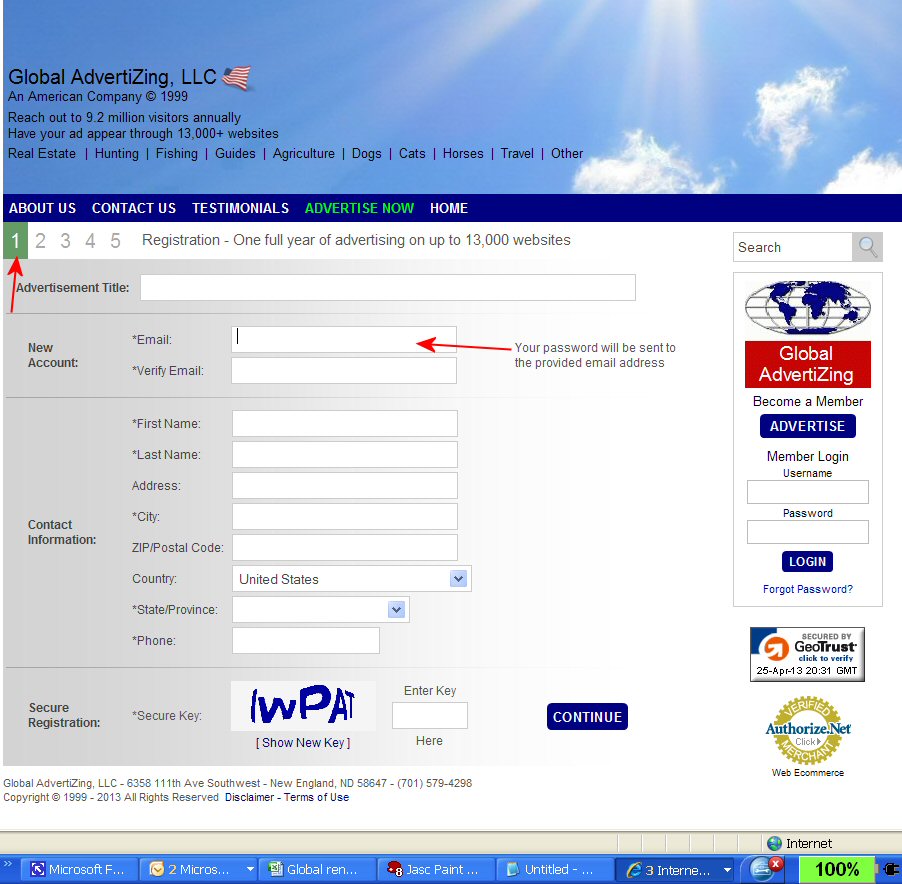
Step 1: Start Ad
See
example screen at right. Click on it to enlarge.
The first requirement of placing your ad
will be to provide a title for your ad and your information. The email
you provide here will be the email you will use to
administer your ad. It will not be available to the public to see.
It will be the email that you use to edit your ad in the future. You will be given an
option to add a different email address for the viewers to
send email to you concerning your ad on Step 2.
Title: Give your ad a very
descriptive title. IE: North Dakota Land for sale
At the end of this page you will
need to read the Secure Registration Secure key and type it into the box provided, then
click on Continue.
If you have entered the Secure Registration Secure key correctly you will go to the next
step (2), if you misread the Secure Registration Secure key you will
be asked to try again, or if there are any other errors such as an
invalid email address (usually misspelled) you will be
prompted to fix the error, then resubmit the Secure Registration Secure
key and then click continue again.
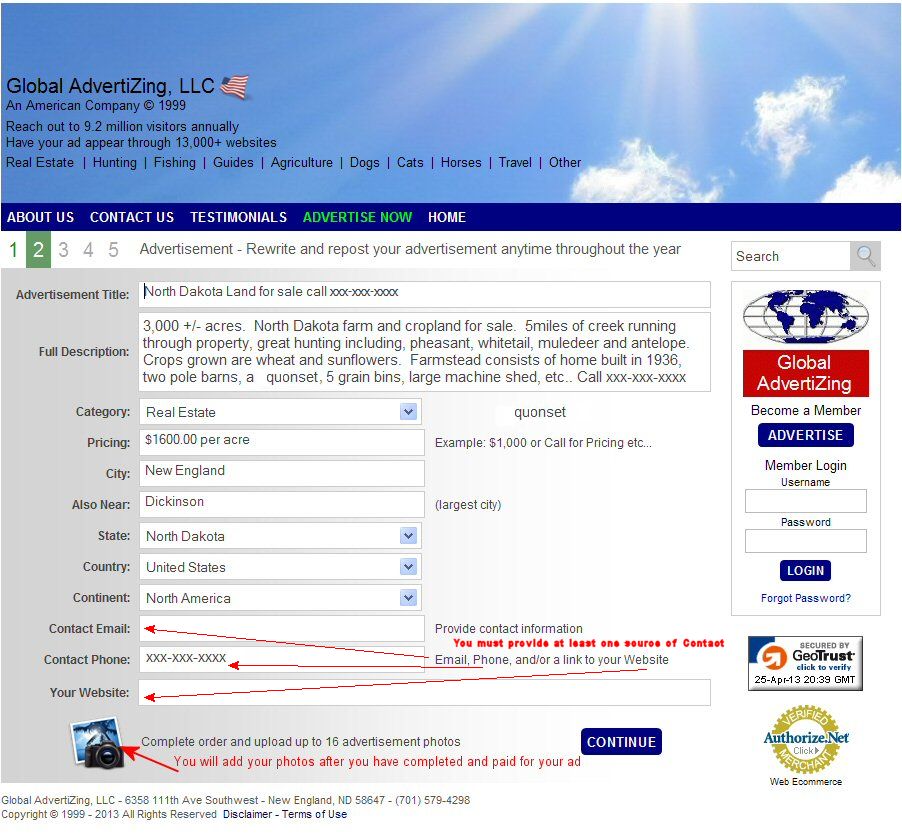
Step 2:
See example screen at right. Click on it to enlarge. Full Description:
There is plenty of room in the
text box to include as much text as you would like about your item or
service. A good idea is
to write your text in a word document or in an email and then copy and
paste it into the box provided for the Full Advertisement Description.
Include your phone number in the text of the ad and it is also a good
idea to include your website address (if you have one) in the text of the ad as well.
Category: Use the drop down
box to change the category if it is not already correct for your
listing.
Pricing: You can
list an item price here, your phone number or write "see website"
City:
List City where your ad pertains to
Also Near: list
your nearest large City, It helps with searching for the best website
matches for your ad
State/Province: List your State or
Province
Country:
List your Country
Continent: List Your Continent
Email: You may provide a
different email other than the one entered on the Start Ad page,
or use the same one, or none at all if you prefer not to be emailed.
Communication by email is least desirable. You will be able to log
into an event center to see who is requiring more information, you will
also receive an email for any ad inquiries.
Phone: List your phone number. We strongly recommend that
you place a phone number in the body text of the ad as well.
Your Website: If you have a
website, place your website address here. If you do not have a
personal website, leave it blank. If you are a real estate agent
listing a particular property, list the particular property page URL
(web address of that particular listing). Then the viewer can go directly to the listing and
not have to sort through other listings to try to find the one described
in your ad. You will
want to write enough in your ad about your item to entice the viewer to go to your
website to find out more. Include your location and your
specialties, making sure that you include your website URL as well as a
phone number where you can be reached. If you want to be reached
by email as well, include that too.
Note: You will be able to edit
your ad any time during the duration of the ad period that you have
chosen after it has been submitted and paid for.
Photo Selection You will place your
photos after the ad payment page. You will log in as a Member and
administer your ad.
At the end of this page
click on Continue.
Step
3:
See example screen at right. Click on it to enlarge.
Category & Keywords
Category: Use the drop down
box to change the category if it is not already correct for your
listing.
Keywords: Keywords are (meta tags)
included within your advertisement for use by Internet search engines.
This can help customers locate your advertisement when searching the
Internet. They are not seen by the viewer. The keywords help
us locate and recommend websites for your ad. They are also cues for the web crawlers and search engines. Only enter words
that are
pertinent to your ad. Pick at least 3 and up to 16
Example: If you have a farm for
sale in North Dakota that has great hunting, is in the badlands, and you
also grow crops on, you would want to include words such as; farm, land,
cattle, horse, farm, hunting farm, farmland,
mule deer, whitetail deer, antelope, pheasant, North Dakota, ND, real estate,
farm for
sale, land for sale, ND farm, North Dakota farm,
pheasant hunting, agriculture, crop, grouse hunting, badlands,
cropland, wheat, etc..
When you are done choosing your keywords,
Update, and then click on
Continue.
Step
4:
See example screen at right. Click on
it to
enlarge.
Website
SelectionListing your
advertisement on multiple websites can greatly enhance
the visibility
of your ad on it's individual advertisement page. Our system will
automatically pick 35 of the best matches it can find for your ad. Each website
selected can help you reach thousands of additional customers.
If you would like to be placed on more websites, simply increase the
number of websites you would like your ad to be placed on in the field
on the right side of the page. You may choose up to 350 websites
from the offered websites. If you are not happy with the complete
selection, you will have the opportunity to switch and replace websites
after payment is received and your ad is posted. If you want to be
found on more than 350 websites, call us for information.
This
page has a Website Selection
Box on the left and a
Website Tally Box
on the right.
A
Price tally
is located under the Website Tally Box.
Once you have chosen the number of the
domain names (websites) that you want to advertise on, click on
Update, and then click on
Continue..
You will go to Step 5, Checkout
Step
5:
See example screen at right. Click on
it to
enlarge.
Checkout
Fill out information exactly like it appears on your Credit Card
Statement.
Click on
Buy Now
Note:
All funds are payable in US dollars.
When you have followed through with
payment, your ad will be posted to the websites chosen.
(Once Payment has cleared)
Please note
that after your ad has been posted you should receive a Customer
notification with your ad information by email from: [email protected].
Since we are an advertising company our email may end up in your spam
box or junk box. Please look there if you do not receive the
confirmation email. This email is important as this is the
information that you need to modify your ad in the future. If you
do not receive your Customer ad notice, You can use the Member login
on the right side of any of our websites.
If you do not find the
notice in your email, or spam box or in your deleted email, then make
sure that your ISP (Internet Service Provider) will let you receive
emails from globaladvertizing.com.
Add globaladvertizing.com as approved
sender under the Sender Lists.
Add Photos or modify text or status of ad
Once your ad has been placed on the websites
selected, you may add your photos.
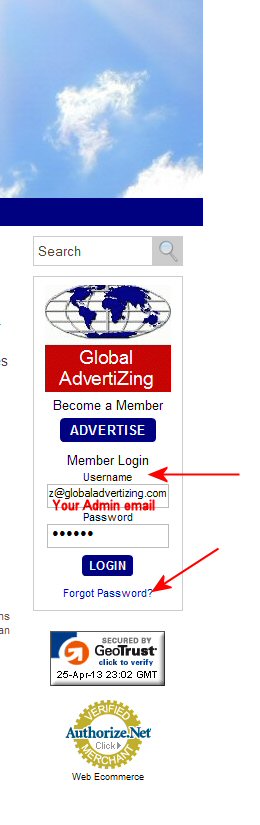
Go to Member Login
on the right side of any of our websites
(see photo A.)
. If you don't have your password, click on Forgot Password.
It will be sent to your administrative email.
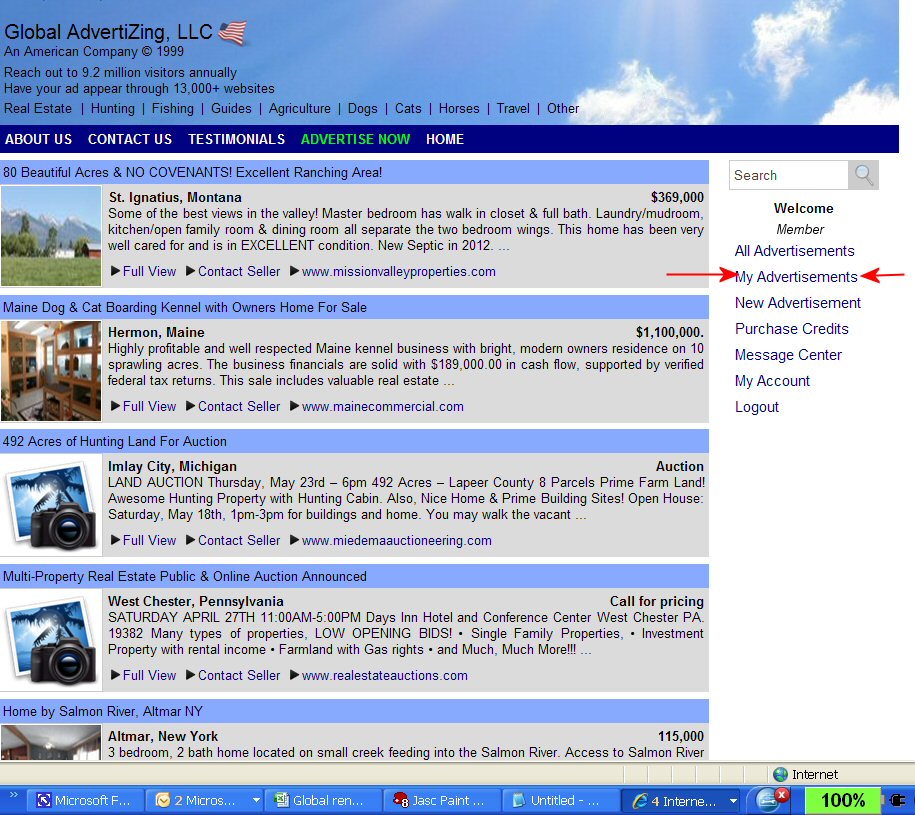
Once in your account, click on
My Advertisements
(see photo B.)
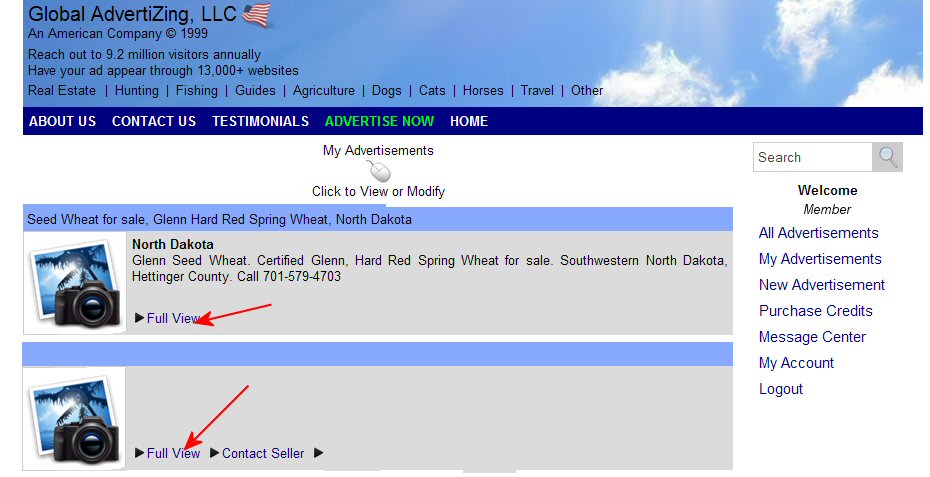
. Click on Full View.
(see photo C.)
Choose the status, change text or add photos
(see photo D.)
A. Login
B. Choose My Advertisements
C. Click on Full View
D. Choose status of ad, or edit ad text,
or add photos
To
ad Photos: Click Add
Photo and add up to 16 photos for
your advertisement (optional). You do not need photos to complete your
ad. They are very beneficial. When you click on
Add Photo it will automatically search
for a folder where you might store your photos on your computer.
You need to know what folder your photos are stored in on your computer
to find them if the folder does not come up automatically.
Uploading photos:
You will want to upload the best photos that you have to showcase the
item. If you have more than 16 photos you can either write in the
ad text to email or call for more photos or you can assemble a collage
of photos on a single merged photo to represent one photo and do this
numerous
times. Example at right,
click on photo to enlarge.
You should try to resize your photos to
800 pixels wide or smaller before uploading. This will enable them to upload
quickly. Very large photos may not upload, especially if you have
a slow internet connection. Photos need to be in .jpg or .gif format.
They should not have any punctuation included in their title ( - _ )are
allowed as well as .jpg or .gif.
You will want to write text about each
photo as well. You will be able to do this on each photo
after it has been uploaded. The photo will upload with an
red x
or yellow star , click on
the photo itself to enter photo description and to choose if you want
the photo as featured photo. The
yellow star will appear
under your Featured photo. Click on Save, Then click
Add Photo to add the
next photo and then enter the text , etc, etc...
If you forget to add text to a particular photo and want to go back and
add text, click on the photo itself and it will enlarge, you can add the text. Do not click on the
red X, (that
will delete the photo). If you want the photos to appear in a
certain order then number the photos, IE: 1, 2, 3, 4, 5, 6, 7, 8, 9, 10.
You do not need to put a period (.) after the number, but you may if you
wish. Write the description of the photo after the number.
You should click the Save button after each photo & text addition, AND when
you are done loading all the photos.
When all photos are
uploaded click on Continue
or you may log out if you are done.
Use our 7,000 + great
domain names to promote your products and services. Real
estate, guides, services, lodging, vacations, pets, travel,
agriculture, information and much more from around the world!
 Global AdvertiZing LLC - An
American Company
Global AdvertiZing LLC - An
American Company
 Start Ad


 Please note